My nixos partition has filled up, here are some steps to recover
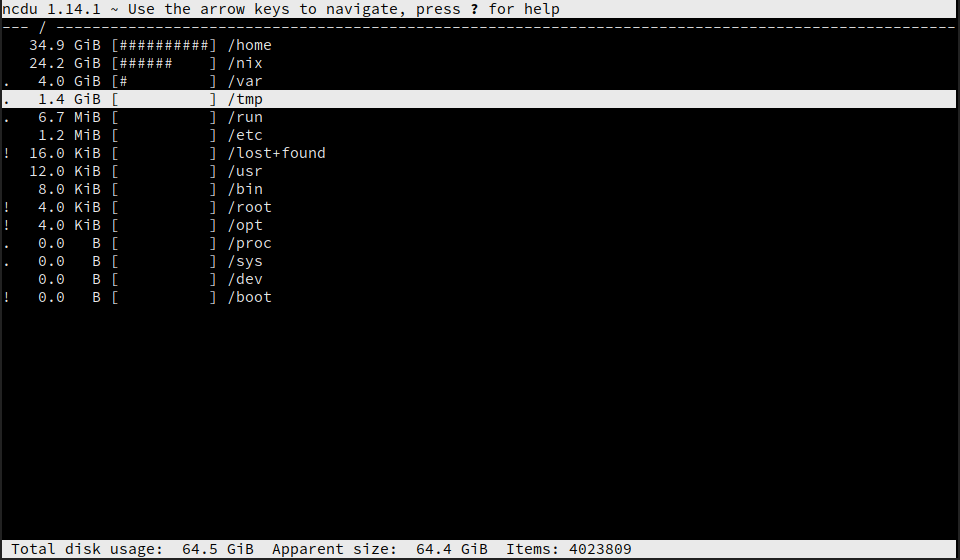
This unix.stackexchange post directed me to the ncdu utility which allows quick diving into which directories are taking up space. Here are some solutions found to help clear out unused diskspace
Clear out log files
Starting position:
$ df -h
/dev/nvme0n1p6  107G  100G  2.3G  98% /
Konsole history files were stored in /tmp/konsole-xxxxxx.history. As I no longer use konsole:
$ rm /tmp/konsole-*.historySystemd journal /var/log/journal is taking up 4.0gb of space, which seems like a specific amount. The arch wiki clarifies that as intentional.
Since I will not be diving deep into the past on this system let's reduce that to 2.0Gb. Normally this is done in /etc/systemd/journald.conf but because NixOS:
configuration.nix
    services.journald.extraConfig = ''
        SystemMaxUse=2G
    '';
And after a nixos-rebuild switch it's down to 2G
Reducing /nix
Since nix tends to accumulate old packages there is documentation around its garbage collector.
Let's get a baseline size for nix - 24.1 GiB
nix-env --delete-generations old
nix-collect-garbage
sudo nix-collect-garbage
We're down to 19.1 GiB
Let's do a full rebuild and make sure we're as compact as possible. Note that this removes old generations, make sure your system is stable first.
nix-channel --update
sudo nix-channel --update
sudo rm /nix/var/nix/gcroots/auto/*
nix-collect-garbage -d
sudo nix-collect-garbage -d
Down to 9.4 GiB
By hardlinking identical files we can save some additional space:
sudo nix-store --optimizeNow we're down to a nice trim 9.0 GiB - a savings of 15.1 GiB at the cost of losing some history.
Note that any shells you have will have to be rebuilt or refetched.
Pruning docker
I use docker for application development, this was done before but can save considerable space:
docker system pruneNote that this will delete a whole bunch of stuff, if you have any data not stored in volumes it will be lost.
Clearing your .cache folder
My .cache folder stands at 9.9 GiB
The highest amount is currently spotify. By editing ~/.config/spotify/prefs and adding:
storage.size=2048then restarting spotify it will trim down its storage.
Next up is yarn.
yarn cache cleansaves me another 2.1 GiB
~/.local/share/Trash has considerable data in it, which after quick verification doesn't have anything I care about.
rm -rf ~/.local/share/Trash/files/*
rm -rf ~/.local/share/Trash/files/.*
After this I spent a bit poking around in ncdu and deleting old projects and forks that were not longer used.
Results
$ du -h
/dev/nvme0n1p6  107G   67G   35G  66% /
That should keep me going a bit longer